圖片設定(image-map)是一種可點選圖片的區域
Examples
簡單的HTML 圖片設定
加上 JavaScript的圖片設定
HTML 圖片設定
你會瞭解圖片設定是一種可點選圖片的區域,一般來說,每一個區域都具有配合的連結,點選其中一個區域,會連結到相關的連結。
Example
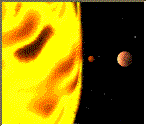
以下的範例顯夙出如何建立一個 HTML 圖片設定image map, 透過可點選的區域,每個區域都是一個超連結:
 width ="145" height ="126"

alt="Planets"

usemap ="#planetmap" />
name="planetmap">


  href ="sun.htm" target ="_blank"

  alt="Sun" />


  href ="mercur.htm" target ="_blank"

  alt="Mercury" />


  href ="venus.htm" target ="_blank"

  alt="Venus" />
|
顯示結果
加上 JavaScript
我們可以在上設定的圖片裏加上事件 (這些都叫做 JavaScript) 到
的標示裏。
標示支援 onClick、onDblClick、onMouseDown、onMouseUp、
onMouseOver、onMouseMove、onMouseOut、onKeyPress、 onKeyDown、
onKeyUp、onFocus、及 onBlur等事件。
上述的例子加上一些 JavaScript 後的原始碼如下:
alt="Planets" usemap="#planetmap" />


請先 登入 以發表留言。